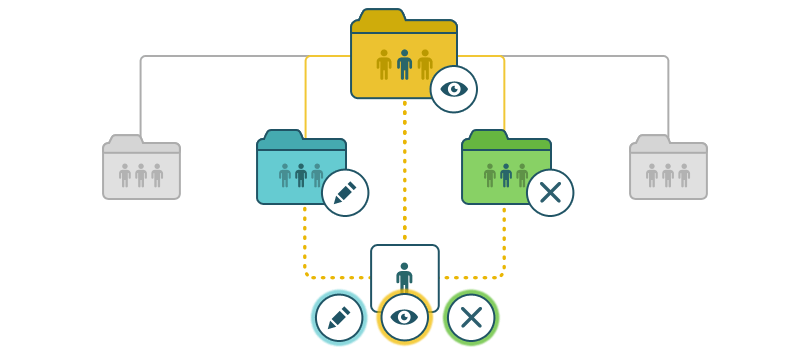
Folder permissions hierarchy
When creating a complex folder structure with multiple nesting levels and different group permissions, it is useful to understand how permission priority works in the Documents module.
Basic principles
There are three levels of priorities in the Documents module (listed in order of increasing importance):
- Folder hierarchy: Parent folders and Subfolders
- If you do not specify certain permissions on a subfolder, the subfolder inherits the parent folder permissions.
- If specific permissions are set on a subfolder, those permissions take priority over the parent folder permissions.
- Profile: Everyone, Groups, User, Admin
- User permissions take priority over group permissions (i.e., permissions can be assigned to an individual user regardless of the permissions of any group they belong to).
- There is no group hierarchy, all groups are equal (i.e., one group cannot have priority over another).
Four levels of priority (listed in order of increasing importance):
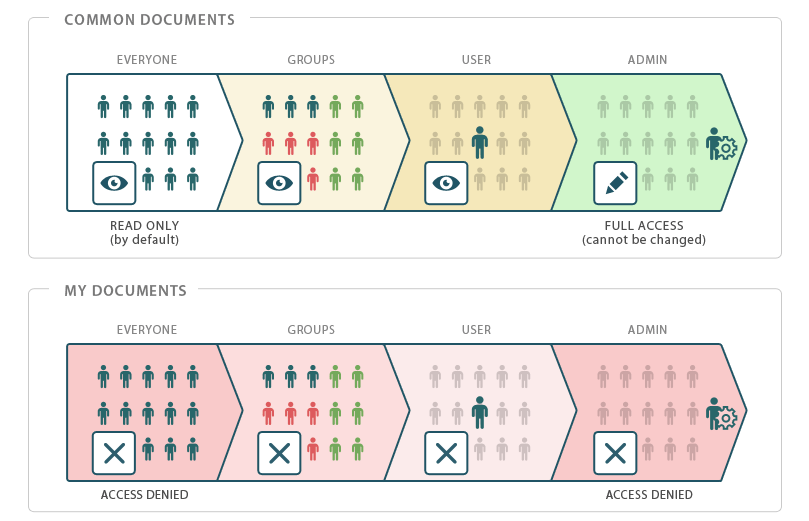
- Access rights: Full Access, Read Only, Access Denied
- Access Denied takes priority over Read Only.
- Read Only takes priority over Full Access.
- If a user belongs to multiple groups with different permissions on a folder, the user is granted the highest-priority access rights.
When a user attempts to access a shared folder, permissions are checked in the following priority order:
- if the current folder has permissions that differ from the parent folder permissions,
- which profile-based permissions are specified on the current folder,
- which access rights has the user.
Examples
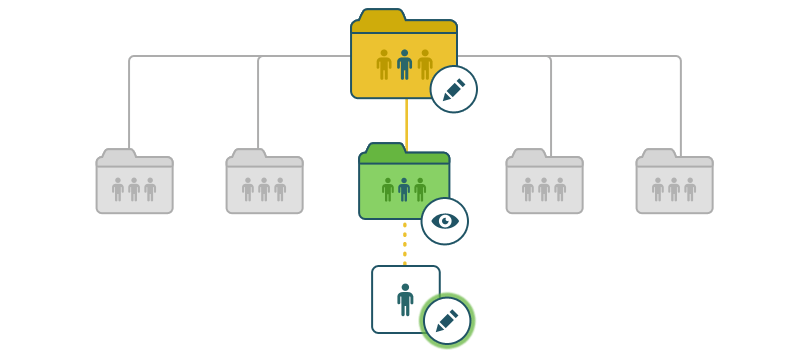
Example 1
The following example illustrates the scenario when a user belongs to a group with Full Access permissions on the parent folder and Read Only permissions on the nested folder, while the user has been granted individual Full Access permissions on the nested folder.
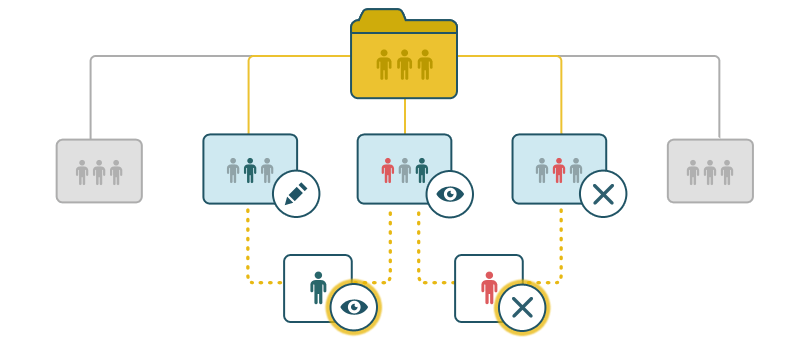
The following examples illustrate the scenarios when a user belongs to several groups with different permissions on a folder.
Example 2
If the first group has Full Access permissions on a folder and the second group has Read Only permissions on the same folder, the user who belongs to both groups at the same time has permissions with the higher priority (in this case, Read Only).
If a user belongs to a group that does not have access to the folder and to a group with Read Only access, Access Denied permissions have the higher priority, consequently, the user does not have access to the folder.
To grant the user a different access type, individual permissions must be assigned.
Example 3
If a folder contains several subfolders, you can change permissions on the subfolders independently from the parent folder permissions.
If the same user belongs to multiple groups with different permissions, their permissions on each nested folder may vary depending on the permissions assigned to each group.