Creating or deleting sheets
Create a sheet
By default, a newly created spreadsheet has a single sheet. To add a new one, tap the  Plus icon located to the left of the sheet navigation panel below the current worksheet.
Manage sheet options
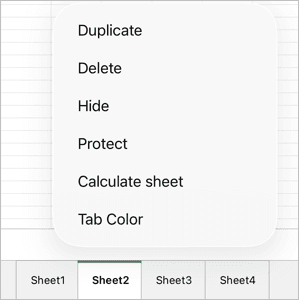
To work with an existing sheet, tap the sheet tab to open the pop-up menu. The menu contains the following options:
- Format — sets font formatting.
- Duplicate — creates an exact copy of the selected sheet.
- Delete — removes the sheet.
- Move — opens the sheet list view to reorder the sheets.
- Hide — hides the sheet without deleting it.
- Protect — restricts changes to the sheet contents.
Tap the  arrow at the end of the menu to access more options:
- Tab color — changes the color of the sheet tab. Pick a color from Theme, Standard, or set your own Custom color.
- Calculate sheet — recalculates all formulas on the active sheet.
Article with the tag:
Browse all tags