Creating lists
Create lists
To create a list in your document:
- Place the cursor to the position where a list will be started (this can be a new line or the already entered text).
- Select the list type using one of the following methods:
- Tap the
 icon at the bottom toolbar, then tap the
  Bullets icon to create an Unordered list or tap the
  Numbers icon tab to create an Ordered list.
 - Tap the
 icon at the top toolbar, go to the Text tab and swipe down to the list options.
Tap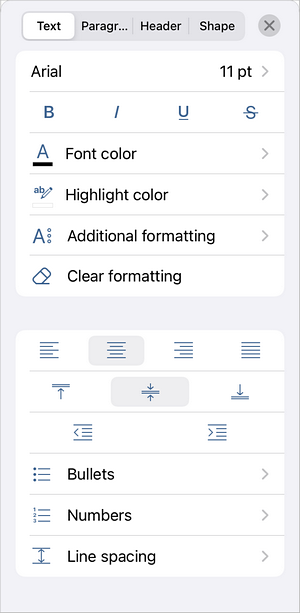 Bullets to create an unordered list or Numbers to create an ordered list. Use the available options to customize how your bullets or numbers look.
- Tap the
- Now each time you press the Enter key at the end of the line a new ordered or unordered list item will appear. To stop that, tap the
 key and continue with the common text paragraph.
You can also change the text indentation in the lists using the Decrease Indent
 and Increase Indent
 icons at the bottom toolbar.
Article with the tag:
Browse all tags