Apply cell style
You can apply one of the formatting presets selecting the cell you wish to format and choosing the desired preset:
- select a cell, a range of cells or the whole worksheet,
- open the Cell settings panel by
- tapping the
 icon at the top or bottom toolbar, or
 - tapping the
option in the pop-up menu and choosing the Cell menu item,
- tapping the
- swipe up to see the Cell style palette and tap the style you want to apply.
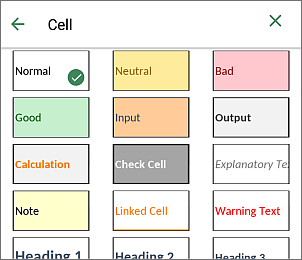
- return to the previous screen by tapping the
 arrow on the left and сlose the cell settings panel by tapping the
  icon on the left.
Article with the tag:
Browse all tags