ADDRESS function
The ADDRESS function is one of the lookup and reference functions. It is used to return a text representation of a cell address.
Syntax
ADDRESS(row_num, column_num, [abs_num], [a1], [sheet_text])
The ADDRESS function has the following arguments:
| Argument | Description |
|---|---|
| row_num | A row number to use in a cell address. |
| column_num | A column number to use in a cell address. |
| abs_num | A type of reference. The possible values are listed in the table below. |
| a1 | An optional logical value: TRUE or FALSE. If it is set to TRUE or omitted, the function will return an A1-style reference. If it is set to FALSE, the function will return an R1C1-style reference. |
| sheet_text | The name of the sheet to use in a cell address. It's an optional value. If it is omitted, the function will return the cell address without the sheet name indicated. |
The abs_num argument can be one of the following:
| Numeric value | Meaning |
|---|---|
| 1 or omitted | Absolute referencing |
| 2 | Absolute row; relative column |
| 3 | Relative row; absolute column |
| 4 | Relative referencing |
Notes
How to apply the ADDRESS function.
Examples
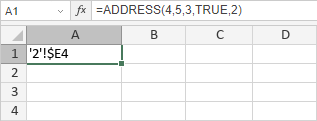
The figure below displays the result returned by the ADDRESS function.
Article with the tag:
Browse all tags