Applying cell style
Apply cell style
You can apply one of the predefined formatting presets to a selected cell:
- Select a cell, a range of cells, or the whole worksheet.
- Open the Cell settings panel by
- tapping the
 icon at the top or bottom toolbar, or
 - tapping the Cell option in the pop-up menu.
- tapping the
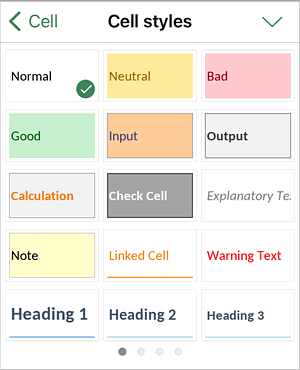
- Tap the Cell styles menu item.
- Swipe up to see the Cell styles palette, swipe right or left to browse all the palettes, and tap the style you want to apply.
- Return to the previous screen by tapping the
 arrow on the left and close the cell settings panel by tapping the
  icon.
icon.
Article with the tag:
Browse all tags