Surligneur de texte: mettre en surbrillance le texte important
Mettez en surbrillance, organisez et mettez visuellement en évidence les fragments importants de vos documents à l'aide du module complémentaire  Surligneur de texte qui est disponible dans l'éditeur de documents et dans l'éditeur de présentations. Veuillez consulter la page sur GitHub du module complémentaire pour en savoir plus.
Important: À partir de la version ONLYOFFICE Docs 8.2, aucun module complémentaire n'est inclus dans l'éditeur par défaut. Il faut installer les modules complémentaires à l'aide du  Gestionnaire de plugins.
- Sélectionnez le texte à surligner.
-
Passez à l'onglet Modules complémentaires et choisissez Surligneur de texte.
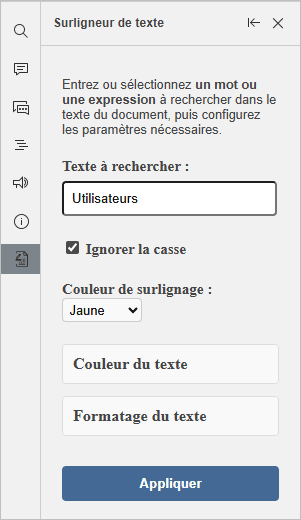
Vous pouvez également ouvrir le module complémentaire et rechercher du texte à l'aide du champ Texte à rechercher. Cochez la case correspondante si vous voulez ignorer la casse.
- Choisissez votre couleur de surbrillance souhaitée parmi les options disponibles.
- Définissez la couleur du texteet la mise en forme du texte, le cas échéant.
- Cliquez sur le bouton Appliquer.
Pour rétablir la mise en forme initiale du texte surligné, sélectionnez le texte mis en surbrillance et cliquez sur le bouton Revenir à partir de l'interface du module complémentaire.