Sélecteur de date: ajouter les dates mises en forme aux cellules
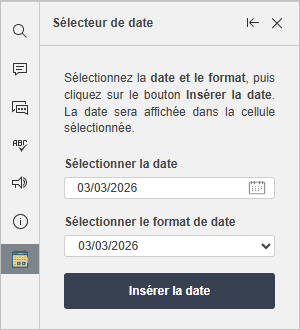
Dans l'éditeur de classeurs, vous pouvez insérer rapidement des dates dans les cellules sélectionnées à l'aide du module complémentaire  Sélecteur de date. Ce module complémentaire fournit un widget de calendrier intégré et vous permet de choisir parmi différents formats de date et de les appliquer à plusieurs cellules simultanément.
Important: À partir de la version ONLYOFFICE Docs 8.2, aucun module complémentaire n'est inclus dans l'éditeur par défaut. Il faut installer les modules complémentaires à l'aide du  Gestionnaire de plugins.
- Passez à l'onglet Modules complémentaires et choisissez Sélecteur de date.
- Sélectionnez les cellules dans lesquelles vous souhaitez insérer la date.
- Cliquez sur le champ Sélectionner une date et choisissez la date dans le calendrier.
- Cliquez sur le champ Sélectionner le format de date et choisissez le format de date souhaité.
- Cliquez sur le bouton Insérer la date.
Une fois la date insérée, l'interface de Sélecteur de date se réinitialise à la date du jour, et vous pouvez ensuite insérer une autre date de la même manière.
Formats de date disponibles
Le module complémentaire prend en charge divers formats de date y compris:
- mm/jj/aaaa
- jj-Mois-aa
- Jour de semaine, mois jj, aaaa
- Et d'autres formats courants