Bergamot Translator: traduire du texte en local
Dans ONLYOFFICE Docs, vous pouvez traduire du texte directement dans l'éditeur hors connexion à l'aide du module complémentaire  Bergamot Translator. Ce module complémentaire utilise la traduction automatique neuronale basée sur la même technologie que Firefox Translations. Veuillez consulter la page sur GitHub du module complémentaire pour en savoir plus.
Important: À partir de la version ONLYOFFICE Docs 8.2, aucun module complémentaire n'est inclus dans l'éditeur par défaut. Il faut installer les modules complémentaires à l'aide du  Gestionnaire de plugins.
Fonctionnalités
- Traduction hors connexion: Fonctionne sans connexion Internet après le téléchargement des modèles
- Respect de la vie privée: Tout le texte est traduit en locale dans votre navigateur à l'aide de WebAssembly
- Traduction automatique neuronale: Traductions de haute qualité à l'aide du moteur Bergamot
- Prise en charge de plusieurs langues: Prend en charge la traduction vers de nombreuses langues européennes
- Mise en cache des modèles: Les modèles linguistiques sont mis en cache de votre navigateur pour l'utilisation hors ligne.
- Saisie manuelle: Possibilité de saisir manuellement du texte à traduire.
Utilisation
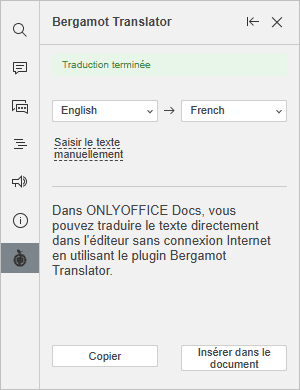
- Installez le module complémentaire à l'aide du Gestionnaire de plugins.
- Passez à l'onglet Modules complémentaires et choisissez Bergamot Translator.
- Sélectionnez le texte à traduire.
- Choisissez les langues source et cible.
- Cliquez sur Insérer dans le document pour remplacer le texte sélectionné par la traduction, ou cliquez sur Copier pour copier la traduction dans le presse-papiers.
Le module complémentaire utilise Bergamot Translator, un port WebAssembly du framework Marian NMT. Les modèles de traduction sont fournis par Mozilla Firefox Translations. Ce module complémentaire fait partie du projet Bergamot.
Comment cela fonctionne
Une connexion Internet est requise lors du premier lancement et lors du téléchargement de nouveaux modèles.
- Première utilisation: Le module complémentaire télécharge le moteur de traduction (WASM) et les modèles linguistiques sélectionnés.
- Mise en cache des modèles: Les modèles sont mis en cache de votre navigateur pour une utilisation hors connexion.
- Traduction: Le texte est traduit en local en utilisant la traduction automatique neuronale.