iOS: Enabling AI in ONLYOFFICE Documents
Enable AI assistant
ONLYOFFICE empowers users to tailor AI tools to their unique workflows. The AI assistant provides easy access to all AI features directly within the mobile editors, allowing you to assign specific tasks to different models based on their capabilities.
Please note that by default, AI is not connected to the editors for security reasons.
- Tap the
 star icon at the top toolbar to open the AI assistant panel.
 - Tap the
 More button in the top right corner of the screen, then tap the
  Add AI Model button.
 -
Fill in the following fields:
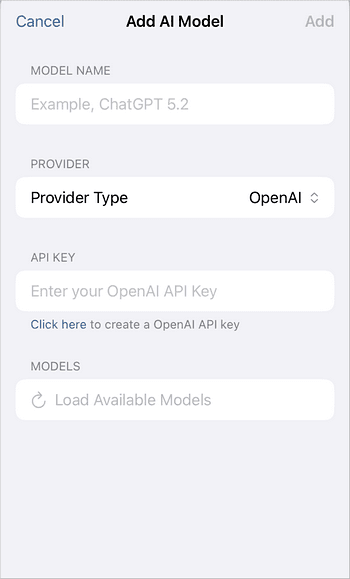
- Model Name — enter a name for the AI model.
-
Provider — select an AI provider from the drop-down list. The following providers are supported: OpenAI, Anthropic, Google, Mistral, Grok, DeepSeek, and Ollama.
Ollama runs AI models locally and requires a running Ollama server. Please verify that Ollama is accessible from your iOS device before selecting this provider.
- API Key — paste the API key from the selected provider's official website.
- Models — tap the Load Available Models button to retrieve the list of models available for the selected provider, then select the necessary model.
- Tap Add in the top right corner of the screen to save the model and complete the connection process.
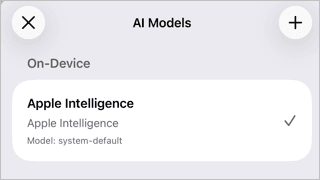
Apple Intelligence is available on device and does not require an API key. It appears in the AI Models screen under On device and is selected by default. Apple Intelligence requires iOS 18.1 or later on a compatible iPhone — see Apple's list of supported models.
Use the AI assistant
Once your AI model is connected, tap the star icon at the top toolbar to open the AI assistant panel. Enter your query in the AI assistant bar or use the quick-access buttons from the menu.
The AI assistant can help you with the following tasks:
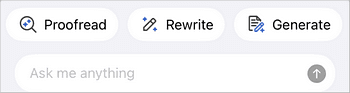
- Check spelling and grammar.
- Rewrite or summarize selected text.
- Generate ideas and improve your writing.
- Translate text.
- Apply text and table formatting.
- Automate routine tasks using natural language queries.