Set paragraph line spacing
Set the line height within a paragraph
- put the cursor within the paragraph you need, or select several paragraphs, or the whole text in the text box,
-
open the settings panel by
-
tapping the
 icon at the top toolbar, or
- tapping the Edit option in the pop-up menu,
-
tapping the
- switch to the TEXT tab and swipe up to see all the settings,
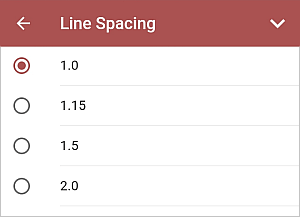
- tap the Line Spacing menu item,
-
select the necessary line height value,
- close the text settings panel by tapping the
 arrow on the right.
Set the amount of space between paragraphs
- put the cursor within the paragraph you need, or select several paragraphs, or the whole text in the text box,
-
open the settings panel by
-
tapping the
icon at the top toolbar, or
- tapping the Edit option in the pop-up menu,
-
tapping the
- switch to the TEXT tab and swipe up to see all the settings,
-
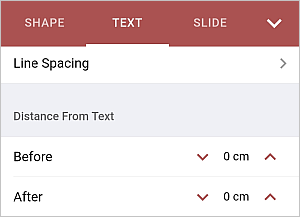
in the Distance from Text section, use one of the following options:
- Before - to set the amount of space before the paragraph,
- After - to set the amount of space after the paragraph.
Use the
 or
or
 arrows to decrease or increase the current value.
- close the text settings panel by tapping the arrow on the right.
Article with the tag:
Browse all tags