REGEXTEST function
The REGEXTEST function is one of the text and data functions. Is used to check whether any part of supplied text matches a regular expression pattern, returning TRUE or FALSE.
Syntax
REGEXTEST(text, pattern, [case_sensitivity])
The REGEXTEST function has the following arguments:
| Argument | Description |
|---|---|
| text | The text string or reference to a cell containing the text you want to test against the pattern. |
| pattern | The regular expression ("regex") that describes the pattern of text you want to match. |
| case_sensitivity | Determines whether the match is case-sensitive. It is an optional argument. If omitted, the match is case-sensitive (0). Enter 0 for case-sensitive matching or 1 for case-insensitive matching. |
Notes
When writing regex patterns, symbols called "tokens" can be used that match with a variety of characters. These are some simple tokens for reference:
- [0-9]: any numerical digit
- [a-z]: a character in the range of a to z
- [A-Z]: a character in the range of A to Z
- .: any single character
- *: zero or more of the preceding character
- +: one or more of the preceding character
- ^: start of the string
- $: end of the string
- \: escape character (e.g., \( matches a literal parenthesis)
- {n}: exactly n occurrences of the preceding character
The function returns TRUE if the pattern matches any part of the text, and FALSE if no match is found.
How to apply the REGEXTEST function.
Examples
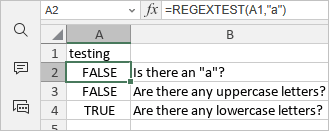
The figure below displays the result returned by the REGEXTEST function.
Article with the tag:
Browse all tags