将 ONLYOFFICE 与 Apple 集成
连接您的 Apple 账户以快速登录您的门户。
获取 Apple 访问密钥
要获取将 Apple 连接到门户所需的访问密钥:
- 前往 Apple 开发者门户。
- 登录您的账户。
- 获取 App ID:
- 前往 Certificates, Identifiers & Profiles > Identifiers,然后点击左上角的 + 图标。
- 选择 App IDs,然后点击 Continue。
- 输入 Description 和 Bundle ID(反向域名样式的字符串:com.domainname.appname)。确保已勾选 Sign In with Apple。点击 Continue,然后点击 Register。
- 获取 Services ID:
- 前往 Certificates, Identifiers & Profiles > Identifiers,然后点击左上角的 + 图标。
- 选择 Services IDs,然后点击 Continue。
- 输入 Description 和 Identifier(反向域名样式的字符串:com.domainname.appname)。确保已勾选 Sign In with Apple。点击 Sign In with Apple 旁边的 Configure。
- 确保已将该 App ID 选为 Primary App ID。添加返回 URL
https://service.onlyoffice.com/oauth2.aspx。点击 Save。 - 点击 Continue,然后点击 Register。
- 创建私钥:
- 前往 Certificates, Identifiers & Profiles > Keys,然后点击左上角的 + 图标。
- 输入密钥的唯一名称。确保已勾选 Sign In with Apple。
- 点击 Configure。在 Choose a Primary App ID 字段中,选择该 App ID 并点击 Save。
- 点击 Continue,然后点击 Register。
- 点击 Download 下载私钥。
- 获取密钥标识符:
- 前往 Certificates, Identifiers & Profiles > Keys。
- 在列表中选择该私钥。
- 密钥标识符显示在密钥名称下方。
将 Apple 连接到 ONLYOFFICE
要将 Apple 连接到门户:
-
点击右上角的
 图标,打开 设置。
-
切换到 集成 选项卡。
-
打开 第三方服务 页面。
-
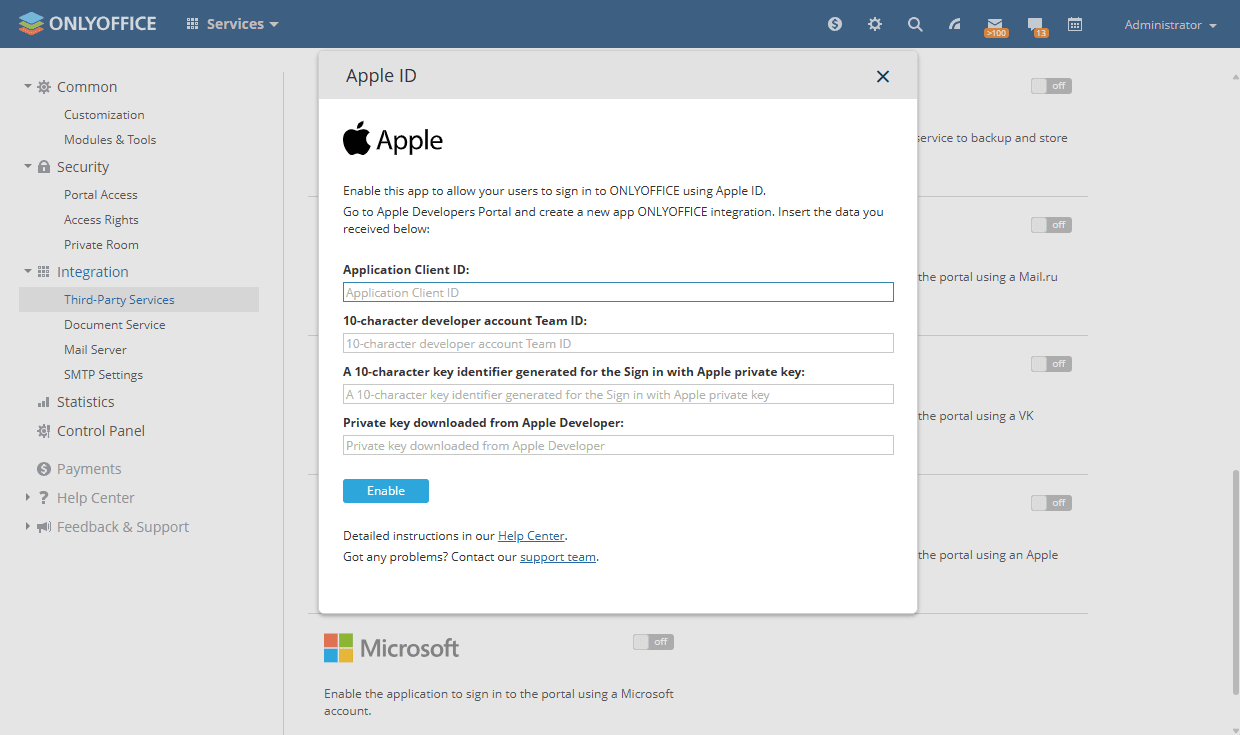
向下滚动到 Apple,然后点击开关将其启用。
-
在打开的 Apple 窗口中,输入在上一节中获得的访问密钥。
-
点击 启用 以连接该服务。