Este artigo foi traduzido por IA
Alterar recuos de parágrafo
Para alterar o deslocamento da primeira linha a partir da parte esquerda da página,
- coloque o cursor dentro do parágrafo desejado, ou selecione vários parágrafos ou todo o texto,
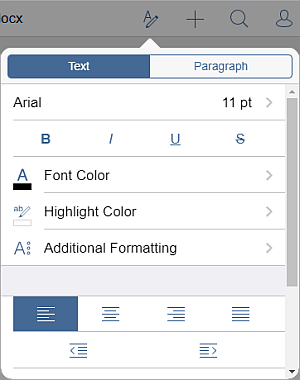
- abra o painel de configurações de texto e parágrafo
- tocando no
 ícone na barra de ferramentas superior, ou
 - tocando na opção Editar no menu pop-up,
- tocando no
- na aba Texto, use os ícones correspondentes: Diminuir Recuo
 e Aumentar Recuo
Artigo com o tag:
Veja todas as etiquetas