Bergamot Translator: Traduzir texto localmente
No ONLYOFFICE Docs, você pode traduzir textos diretamente no editor sem uma conexão com a Internet usando o plugin  Bergamot Translator. O plugin utiliza tradução automática neural alimentada pela mesma tecnologia do Firefox Translations. Consulte a página do GitHub do plugin para saber mais.
ImportanteA partir do ONLYOFFICE Docs 8.2, nenhum plugin vem com os editores por padrão. Os plugins devem ser instalados através do  Gerenciador de Plugins.
Recursos
- Tradução Offline: Funciona sem conexão com a Internet após o download dos modelos
- Privacidade Garantida: Toda a tradução acontece localmente no seu navegador usando WebAssembly
- Tradução Automática Neural: Traduções de alta qualidade usando o mecanismo Bergamot
- Suporte Multilíngue: Suporta tradução entre diversos idiomas europeus
- Cache de Modelos: Os modelos de linguagem são armazenados no cache do seu navegador para uso offline
- Entrada Manual: Opção para inserir texto manualmente para tradução
Uso
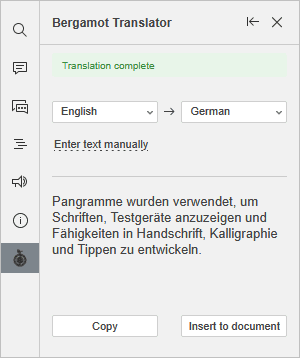
- Instale o plugin através do Gerenciador de Plugins.
- Vá para a aba Plugins e escolha Bergamot Translator.
- Selecione o texto que deseja traduzir.
- Escolha os idiomas de origem e de destino.
- Clique em Inserir no documento para substituir o texto selecionado pela tradução, ou clique em Copiar para copiar a tradução para a área de transferência.
O plugin utiliza o Bergamot Translator, uma porta WebAssembly do framework Marian NMT. Os modelos de tradução são fornecidos pelo Mozilla Firefox Translations. O plugin faz parte do Projeto Bergamot.
Como funciona
Uma conexão com a Internet é necessária para o primeiro lançamento e para o download de novos modelos.
- Primeiro uso: O plugin baixa o mecanismo de tradução (WASM) e os modelos de linguagem selecionados.
- Cache de modelos: Os modelos são armazenados no cache do seu navegador para uso offline.
- Tradução: O texto é traduzido localmente usando tradução automática neural.