この記事はAIによって翻訳されました
テキストハイライター:重要なテキストを強調表示する
ドキュメントの重要な部分を強調表示し、整理し、視覚的に際立たせるために、 テキストハイライタープラグインを使用できます。このプラグインはドキュメントエディターおよびプレゼンテーションエディターで利用可能です。詳細については、プラグインのGitHubページを参照してください。
重要ONLYOFFICE Docs 8.2以降、エディターにはデフォルトでプラグインが含まれていません。プラグインは プラグインマネージャーを通じてインストールする必要があります。
- ハイライトしたいテキストを選択します。
- プラグインタブに切り替え、 テキストハイライターを選択します。
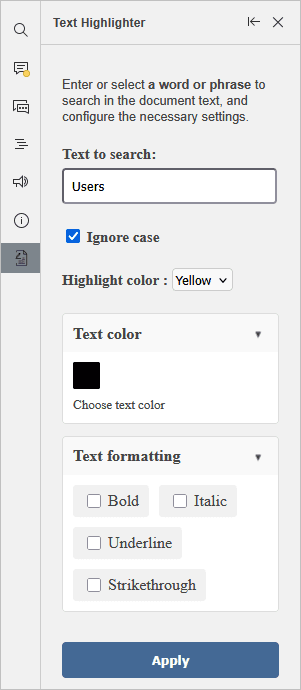
プラグインを開き、検索するテキストフィールドを使用してテキストを検索することもできます。大文字と小文字を無視する場合は、対応するチェックボックスをマークしてください。
- 利用可能なオプションから希望のハイライトカラーを選択します。
- 必要に応じてテキストカラーとテキスト書式設定を設定します。
- 適用ボタンをクリックします。
ハイライトされたテキストを元の書式に戻すには、ハイライトされたテキストを選択し、プラグインインターフェースで戻すボタンをクリックします。
次の項目が含まれている記事:タグ:
すべてのタグを見る