Questo articolo è stato tradotto dall'AI
Modificare il layout delle diapositive
Per personalizzare la tua presentazione, puoi modificare il layout delle diapositive per ciascuna diapositiva separatamente. Per cambiare il layout di una diapositiva:
- nella lista delle diapositive a sinistra, tocca la diapositiva a cui desideri applicare un nuovo layout,
- apri il pannello delle impostazioni della diapositiva
- toccando l'icona
 nella barra degli strumenti in alto, oppure
 - toccando l'opzione Modifica nel menu a comparsa,
- toccando l'icona
- tocca l'elemento del menu Layout,
- seleziona il layout necessario (scorri verso l'alto per vedere più layout),
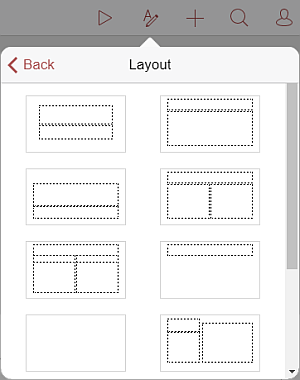
Nota: attualmente, sono disponibili i seguenti layout: Diapositiva Titolo, Titolo e Contenuto, Intestazione Sezione, Due Contenuti, Confronto, Solo Titolo, Vuoto, Contenuto con Didascalia, Immagine con Didascalia, Titolo e Testo Verticale, Titolo e Testo Verticale.
Voci con l'etichetta tag:
Sfoglia tutti i tag