Este artículo está traducido por IA
Cambiar la configuración de la aplicación
Para acceder a la configuración avanzada del Editor de Hojas de Cálculo:
- Toque el
 icono de Herramientas en la esquina derecha de la barra de herramientas superior.
 - Toque la flecha junto al elemento del menú
 Configuración de Hoja de Cálculo.
Actualmente, están disponibles las siguientes configuraciones avanzadas:
- VISTA - se utiliza para especificar qué elementos de la interfaz desea ocultar o mostrar:
- Líneas de cuadrícula - este interruptor está activado por defecto. Permite ocultar o mostrar nuevamente las líneas que aparecen alrededor de las celdas.
- Encabezados - este interruptor está activado por defecto. Permite ocultar o mostrar nuevamente el encabezado de columna en la parte superior y el encabezado de fila a la izquierda de la hoja de trabajo.
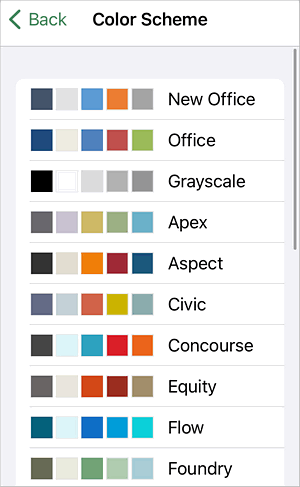
- ESTILO - se utiliza para seleccionar el Esquema de Color necesario. Permite cambiar la paleta de colores predeterminada para los elementos de la hoja de trabajo (fuente, fondo, autoformas y gráficos).
Artículos con etiqueta:
Ver todas las etiquetas