LOGEST function
The LOGEST function is one of the statistical functions. It is used to calculate an exponential curve that fits the data and returns an array of values that describes the curve.
Syntax
LOGEST(known_y’s, [known_x’s], [const], [stats])
The LOGEST function has the following arguments:
| Argument | Description |
|---|---|
| known_y’s | The set of y-values you already know in the y = b*m^x equation. |
| known_x’s | The optional set of x-values you might know in the y = b*m^x equation. |
| const | An optional argument. It is a TRUE or FALSE value where TRUE or lack of the argument forces b to be calculated normally and FALSE sets b to 1 in the y = b*m^x equation and m-values correspond with the y = m^x equation. |
| stats | An optional argument. It is a TRUE or FALSE value that sets whether additional regression statistics should be returned. |
Notes
Please note that this is an array formula. To learn more, please read the Insert array formulas article.
How to apply the LOGEST function.
Examples
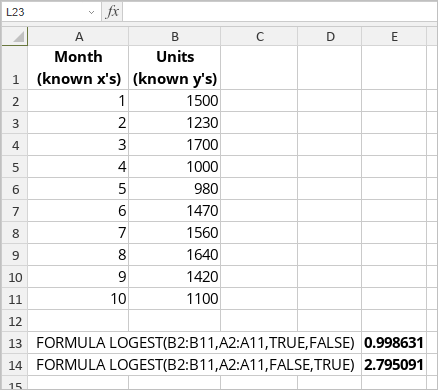
The figure below displays the result returned by the LOGEST function.