XLOOKUP function
The XLOOKUP function is one of the lookup and reference functions. It is used to perform the search for a specific item by row both horizontally and vertically. The result is returned in another column and can accommodate two-dimensional datasets.
Syntax
XLOOKUP (lookup_value, lookup_array, return_array, [if_not_found], [match_mode], [search_mode])
The XLOOKUP function has the following arguments:
| Argument | Description |
|---|---|
| lookup_value | A value to search for. |
| lookup_array | An array or range to search in. |
| return_array | An array or range to return the results to. |
| if_not_found | An optional argument. If there is no search result, the argument returns the text stated in [if_not_found]. In case the text is not specified, the “N/A” is returned. |
| match_mode | An optional argument. The possible values are listed in the table below. |
| search_mode | An optional argument. The possible values are listed in the table below. |
The match_mode argument can be one of the following:
| Value | Description |
|---|---|
| 0 | Set by default. Returns the exact match; if there is no match, the “N/A” is returned instead. |
| -1 | Returns the exact match; if there is none, the next smaller item is returned. |
| 1 | Returns the exact match; if there is none, the next larger item is returned. |
| 2 | A wildcard match. |
The search_mode argument can be one of the following:
| Value | Description |
|---|---|
| 1 | Set by default. Starts a search at the first item. |
| -1 | Starts a reverse search, i.e. at the last item. |
| 2 | Starts a binary search with the lookup_array sorted in ascending order. If not sorted, invalid results will be returned. |
| -2 | Starts a binary search with the lookup_array sorted in descending order. If not sorted, invalid results will be returned. |
Notes
Wildcard characters include the question mark (?) that matches a single character and the asterisk (*) that matches multiple characters. If you want to find a question mark or asterisk, type a tilde (~) before the character.
Please note that this is an array formula. To learn more, please read the Insert array formulas article.
How to apply the XLOOKUP function.
Examples
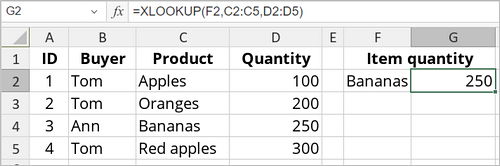
The figure below displays the result returned by the XLOOKUP function.